
A guest visits two of your restaurants, uses the same email address at both and later clicks “unsubscribe.” Which campaigns should stop? The answer depends on who was sending, what the guest agreed to and what the unsubscribe promised. A location tag alone cannot answer it.
This guide is for operators who already have multiple guest lists or a shared database and need rules for real-world conflicts. It focuses on campaign eligibility, duplicate guests and unsubscribe handling rather than another comparison of list architectures.
The recommendations are an operational starting point, not legal advice. Identify the businesses responsible for the data and review the applicable privacy and marketing rules before combining records or expanding their use.
Put this guide to work
Free worksheets, campaign templates and a venue growth calculator. No email gate.
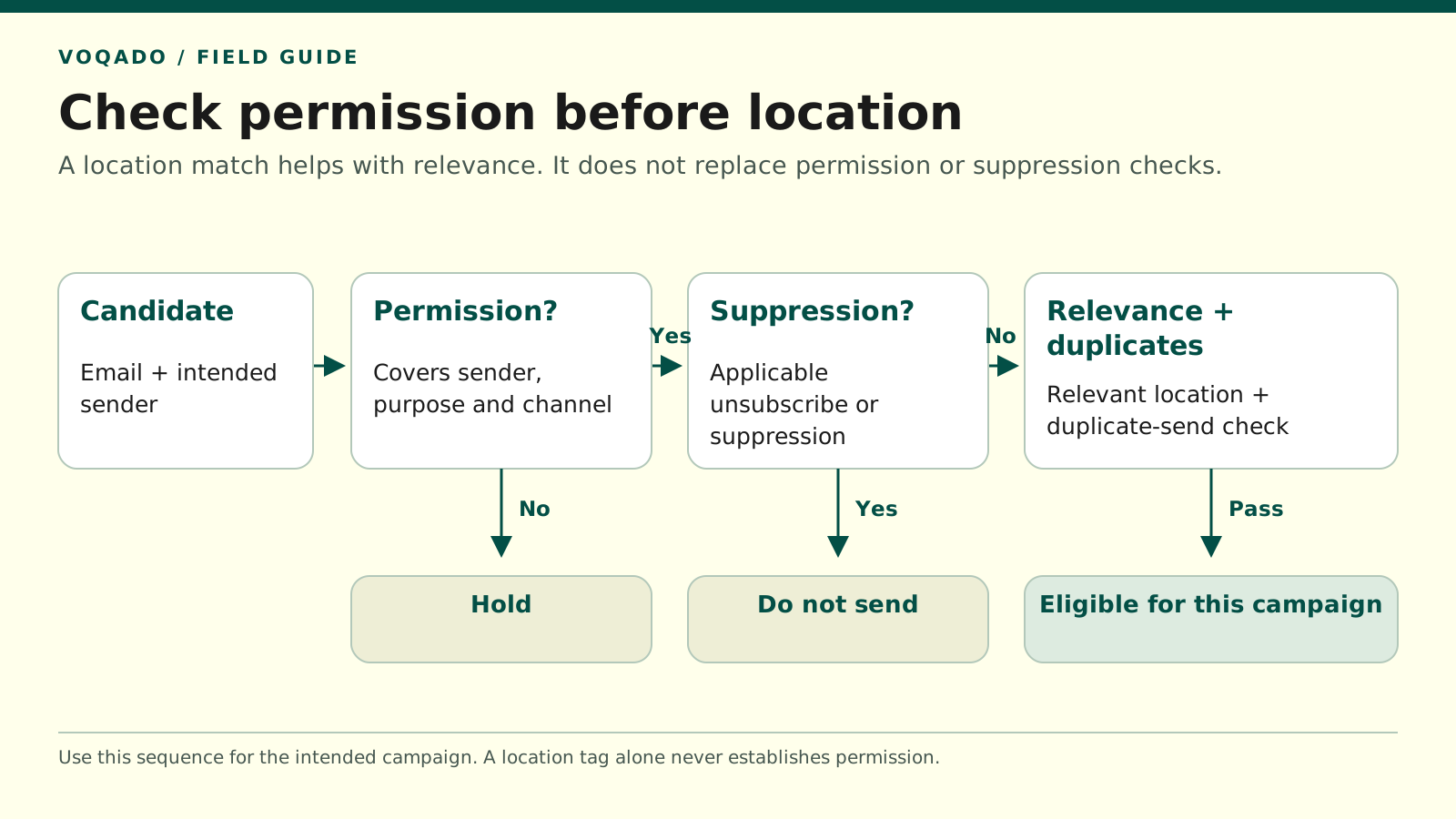
Evaluate sender, purpose and channel first, then applicable suppression, then location relevance and duplicate sending.
Start with the sender and the promise
Write a short permission statement for each current signup flow:
At [location], [named business] asks for permission to send [email content] about [defined brand or locations]. The guest can withdraw through [method].
If you cannot complete that sentence from the wording the guest actually saw, investigate before sending a cross-location campaign. A privacy notice that mentions a corporate group does not automatically establish consent for every company in it to send marketing.
For consent-based UK electronic marketing, ICO guidance says the permission must identify the organization and cover the relevant communication method. It also explains that the products-and-services soft opt-in is subject to specific conditions; another group company’s collection does not automatically give you that exception. Do not treat a restaurant visit or a shared logo as a shortcut around this assessment. ICO electronic-marketing guidance
A single legal operator sending clearly described group-wide offers may have a different setup from separately owned franchisees sharing a name. Document the actual arrangement. One dashboard does not make separate businesses a single sender, and separate dashboards do not necessarily make one business several senders.
Separate the contact from its permissions
Treat an email address as a contact route with associated evidence, rather than a universal “marketable” flag.
A useful working model has three parts:
| Record | What it should describe |
|---|---|
| Contact | Address, stable identifier and carefully checked duplicate links |
| Permission or restriction | Sender, channel, purpose, scope, status, event time and evidence |
| Location relationship | Where the guest signed up or visited, and any explicitly chosen location preferences |
These are suggested concepts for your records, not required database fields or a claim that a particular product provides them automatically. Your portal and email provider may represent them differently.
The separation prevents a common error: a new visit updates the contact profile and accidentally resets a marketing restriction. A guest can return to the restaurant and use its WiFi without wanting promotional emails again.
Use a decision table for recurring situations
The examples below assume an email marketing program using permission records. The exact legal result still depends on the scope and circumstances.
| Situation | Safe operational next step |
|---|---|
| Same guest, same operator, valid permission clearly covering both restaurants | Consider relevant campaigns for either location after checking restrictions and duplicate delivery |
| Permission describes only Restaurant A, but the team wants to promote Restaurant B | Hold B’s campaign for this guest until the scope is reviewed or appropriate new permission exists |
| Guest visits B after unsubscribing from the operator’s brand emails | Keep the brand-level restriction; a WiFi visit does not renew permission |
| Two independent franchisees hold the same address | Do not merge permissions or share histories merely because the addresses match |
| Local preference is “A only,” while group marketing permission remains active | Apply both the valid permission and the narrower content preference |
| One record says subscribed and another shows a later applicable withdrawal | Apply the withdrawal unless a later valid change is evidenced; retain the event history |
| Timestamps or sender scope conflict and the intended state is unclear | Exclude the record from the affected campaign while reviewing it |
The table distinguishes “may be eligible” from “send now.” Relevance, delivery exclusions, the campaign’s actual sender and the guest’s current preferences still need checking.
Make unsubscribe scope clear to guests
For one business sending a group newsletter, an ordinary unsubscribe should stop that marketing across all the systems used to send it. It should not require the guest to discover that each restaurant keeps another copy of their address.
A preference center can additionally offer local interests, such as “news from the riverside restaurant.” Keep that separate from a clear option to stop the sender’s marketing. The FTC’s US CAN-SPAM guidance permits category menus but requires an option to stop all marketing messages from the sender. FTC guidance on opt-outs
If genuinely separate businesses send independently, explain the sender and scope accurately. Avoid silently translating a broad “stop contacting me” request into the narrowest possible technical unsubscribe. Escalate ambiguous requests, and pause the affected sending while resolving them.
Do not solve this by circulating a complete customer database among franchisees. Establish an authorized, minimal way to honor the relevant restriction. The ICO describes suppression records as a way to prevent future unwanted marketing and says to keep only the information necessary for that purpose. ICO suppression-list guidance
Check how your email platform actually behaves
An unsubscribe in one audience may not update another audience. Mailchimp explicitly treats its email audiences independently and recommends a primary audience with tags for a single organization where suitable. This is a provider-specific behavior to account for, rather than a universal instruction to merge every restaurant group’s data. Mailchimp unsubscribe documentation
Ask whoever maintains your integration:
- Where is the current restriction recorded?
- Which system is authoritative when two statuses disagree?
- Does a withdrawal stop queued and automated campaigns as well as manual sends?
- Can a portal login or nightly import overwrite the restriction?
- What happens while the synchronization is unavailable?
Require an exception queue or another visible failure process. “The integration usually syncs” is not enough when the missing event is an unsubscribe.
Deduplicate delivery without inventing identity
Deduplication has two different jobs: avoiding repeated contact records and avoiding repeated campaign delivery. You may need to preserve separate permission records while ensuring the same eligible mailbox receives a group campaign once.
For one authorized sender, create the final eligible recipient set across the selected locations before dispatch. Use a shared campaign identifier and delivery record so that two location jobs cannot independently send the same campaign to the same address.
If the platform cannot enforce that across audiences, coordinate the sends or use its supported consolidation process after reviewing permissions. Mailchimp notes that sending the same campaign separately to two audiences can produce two messages for an address present in both. Mailchimp duplicate-campaign explanation
Do not merge two addresses solely because they share a name, appear from the same device or resemble aliases. A household may share a mailbox; one person may legitimately use several. An address match is a useful delivery key, not proof of a single human identity. Let guests state their preferred address rather than guessing.
Apply this pre-send rule
For every intended recipient, check the conditions in this order:
- The recorded permission or other approved basis covers this sender, channel and purpose.
- No applicable withdrawal, complaint or delivery suppression blocks the message.
- The content fits the guest’s location preferences and the campaign’s scope.
- The same campaign has not already been sent to this address through another location.
Diagram text alternative: A candidate address enters a permission check. Missing or unclear permission leads to a hold. Applicable suppression leads to no send. The remaining records pass through location-relevance and duplicate-send checks before becoming eligible for that campaign.
That is a decision for each campaign, not a permanent label on the person.
Test with a cross-location guest before your next launch
Use addresses controlled by your team. Subscribe through Restaurant A, then visit Restaurant B. Check that a second connection does not create an unexpected welcome sequence or broaden permission.
Next, unsubscribe from the group sender. Verify that A’s list, B’s list, central campaigns and relevant automated messages all honor the intended scope. Repeat with a local preference change rather than a complete unsubscribe, and confirm the two actions produce different, appropriate results.
Finally, replay an older subscribed export. It should not reactivate the test address against its current restriction. If it does, fix that update rule before inviting the whole group to use the new campaign process.
For VoqadoWiFi deployments, confirm how the current portal-to-email integration handles these cases rather than assuming location filters handle permission too. Keep the sender definitions, test results and unresolved exceptions with your campaign checklist. This gives local managers room to send relevant updates while ensuring a guest’s choice remains consistent across the group.
Share this article