
A restaurant review request can be one sentence: “If you’d like to share your experience, you can leave an honest Google review here.” The difficult part is the workflow around that sentence.
Two guests should have the same opportunity to review your restaurant even if one loved the meal and the other complained. These templates help you ask consistently without a satisfaction screen, a reward or pressure from a member of staff.
“Every guest” means the invitation is available fairly. It does not mean emailing people without the appropriate permission, ignoring opt-outs or sending a request after every connection to the guest network.
Put this guide to work
Free worksheets, campaign templates and a venue growth calculator. No email gate.
The rule to build around
Google prohibits selectively soliciting positive reviews, discouraging negative reviews and offering incentives for reviews. Its current policy also prohibits requiring or pressuring people to review while on the premises and requesting particular review content. That includes asking staff to solicit a specified number of reviews. Google Maps content policy
Build one neutral invitation for all guests who meet objective, sentiment-independent eligibility rules. For example: a recorded completed visit, appropriate contact permission and no request within your chosen frequency cap. A guest’s complaint, satisfaction score, spending level or perceived likelihood of leaving five stars should not decide whether they receive the public link.
An optional private feedback channel can remain available to everyone. It must not become the route assigned to unhappy guests while happy guests alone see Google.
Get the right link before writing the message
Use the review link or QR code generated through the restaurant’s Google Business Profile. Google documents this in its review-link instructions.
Check the restaurant name, street address and location before copying the link into an automation. A group with several branches needs a verified mapping from each venue to its own profile. Scan a printed proof on a phone and check the destination before ordering a batch of cards.
Google says reviewers need to sign in to a Google Account, which does not have to use a Gmail address. Set that expectation if someone asks for help; never offer to sign in or write the review for them. Google review guidance
Eight copy-ready restaurant review requests
Replace every placeholder. For email, include your actual sender identity, a monitored reply-to address and the footer described below. Do not add a discount, prize draw or free item to any of these requests.
1. The short post-visit email
Subject: How was your visit to [Restaurant]?
Hi [First name],
Thanks for visiting [Restaurant, location]. If you’d like to share your experience, you can leave an honest Google review using the link below.
Your feedback can help other guests decide where to eat. Reviewing is completely optional.
[Leave a Google review]
The [Restaurant] team
Use when: You have a reliable visit trigger and permission appropriate to the message. If WiFi activity is your only signal, avoid saying you know what they ordered or when they finished eating.
2. The practical, location-specific version
Subject: Share your experience at [Restaurant, location]
Hi [First name],
Thank you for spending time at our [location] restaurant. If you’d like to tell other guests about your experience, here’s our Google review link:
[Leave an honest review of Restaurant, location]
Please share whatever you think is useful, in your own words. There’s no obligation to leave a review.
Thank you, The [Restaurant] team
Use when: Several locations share a brand and guests could otherwise reach the wrong profile. Do not append suggested phrases or keywords.
3. Public review plus optional private contact
Subject: Your feedback on [Restaurant]
Hi [First name],
Thanks for visiting us. You’re welcome to share your experience publicly on Google:
[Leave an honest Google review]
If you would also like to contact our team directly about any part of your visit, reply to this email or use [contact link]. Both options are available to everyone, and either is entirely your choice.
The [Restaurant] team
Use when: Staff can respond to direct feedback. Keep both options visible to every eligible recipient, without asking for a rating first.
4. One optional reminder
Subject: The review link for [Restaurant]
Hi [First name],
If you wanted to share feedback about your visit, here’s the Google review link again:
[Leave an honest Google review]
If you have already left a review, thank you. No action is needed, and we won’t send another reminder about this visit.
The [Restaurant] team
Use when: Your frequency rules permit one reminder and you can keep that promise. A single request is a reasonable default; a reminder is optional, not a requirement.
5. A receipt message
Thank you for visiting [Restaurant, location].
Want to share your experience? Scan the code to leave an honest Google review whenever convenient.
Reviews are optional. We appreciate hearing from our guests.
Use when: The same message can appear on all relevant receipts. Do not have staff circle it only for tables they judge to be happy.
6. A table card
Tell other guests about your visit
If you’d like to leave an honest Google review of [Restaurant, location], scan this code whenever it suits you.
You can also contact our team at [contact method].
Use when: The card is available consistently and staff do not wait over guests while they review. Keep it an invitation they can use later.
7. A short staff script
“If you’d like to share your experience, the receipt has a link for an honest Google review. You’re welcome to use it whenever convenient.”
Use when: A guest asks how to leave feedback, or as a neutral, low-pressure invitation under your service policy. Do not turn the script into a quota, request a rating or ask the guest to mention the server’s name.
8. A takeaway bag insert
Thanks for ordering from [Restaurant, location]. We hope your meal travels well.
After you’ve tried it, you’re welcome to share your experience in an honest Google review: [short link or QR code].
For questions about your order, contact [support contact]. Both options are available to every customer.
Use when: The review link identifies the restaurant that fulfilled the order. Keep help with an order unconditional, regardless of whether the customer reviews it.
Keep email permission separate from WiFi access
Do not assume every captured email can receive a review request. Determine the applicable rules for your jurisdiction, the message’s purpose and the permission actually collected. For a conservative operational approach, send these campaigns to appropriately opted-in contacts and honor suppressions across your systems.
An email footer can say:
“[Restaurant legal name] · [valid postal address]. You’re receiving this because [accurate explanation]. [Unsubscribe from marketing emails] · [Privacy notice].”
The FTC distinguishes commercial messages from narrowly defined transactional messages; being an existing customer does not automatically make every email transactional. If the request includes promotion, do not assume it is exempt from commercial-email requirements. FTC CAN-SPAM guide
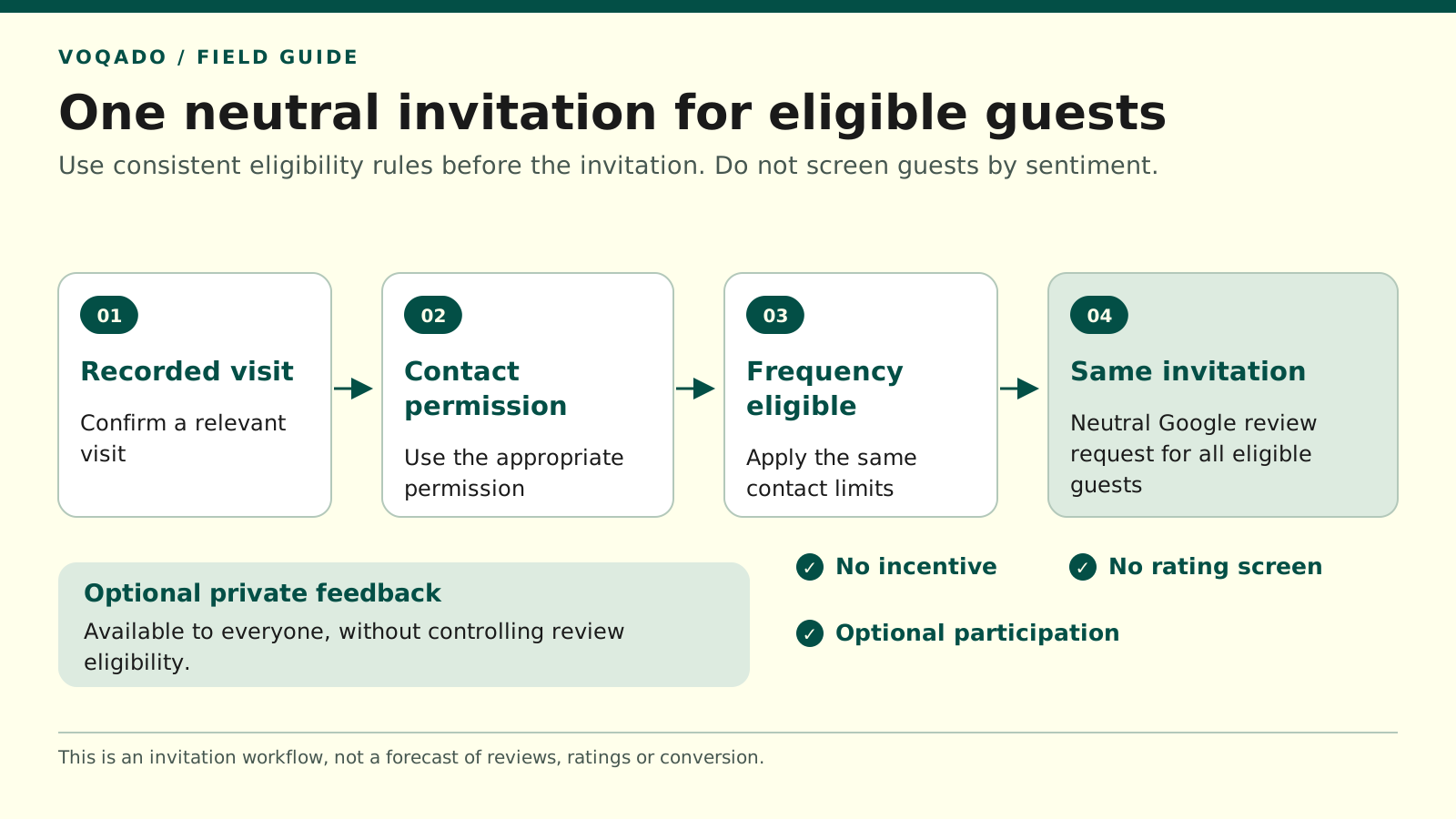
Use the same neutral Google review invitation for all eligible guests, with optional private feedback available to everyone.
Audit the whole route, including your software
Read the actual email and follow every button on a test device. Marketing copy about a platform is not evidence of what a configured automation does.
Test these cases before enabling requests:
- A guest gives positive private feedback
- A guest gives negative private feedback
- A guest provides no private feedback
- A guest unsubscribes before the queued send
- A guest reconnects several times during one meal
- A guest visits a different branch
The first three should have the same public-review invitation under the same eligibility conditions. The fourth must respect the opt-out. The fifth should not produce duplicate requests. The sixth must point to the correct location.
If a tool cannot deliver a neutral, ungated invitation, do not enable that review flow. Use a verified direct link through an appropriate messaging channel or a consistently available printed invitation instead.
Measure delivery and access without inventing attribution
Keep three separate counts: delivered requests, review-link clicks and the change in published reviews. A click is not a completed review, and the change in a profile’s review count cannot automatically be assigned to an email campaign. Other guests may post reviews, and reviews may be delayed or removed.
Use the numbers to find operational problems. A broken link can explain low clicks. Duplicate invitations point to poor session deduplication. A burst of unsubscribes may suggest excessive contact. None of those problems is fixed by screening out unhappy guests.
Start with one template, one verified location link and one documented eligibility rule. That gives your team a review process they can explain and guests an honest choice about whether to participate.
Share this article