
A useful restaurant email gives someone a reason to visit and makes the next step easy. Sending “we miss you” to yesterday’s diner makes good copy feel careless.
Choose one version per occasion below. These are alternatives to test, not twelve emails to send to every guest.
Set these rules before copying the emails
A WiFi login is not automatically permission to send promotions. Use contacts with an appropriate marketing permission record, and keep joining the network separate from choosing marketing. For UK individual subscribers, the ICO describes consent requirements and a limited products-and-services soft opt-in with specific conditions. Do not assume a WiFi connection meets those conditions. ICO electronic-mail guidance
Put this guide to work
Free worksheets, campaign templates and a venue growth calculator. No email gate.
Before launch:
- Replace every bracketed field, including location, hours, prices and offer restrictions
- Use a real reply-to inbox that someone checks
- Default to “Hi there” when the first name is missing or unreliable
- Exclude unsubscribed, suppressed and invalid addresses
- Check recent sends across all campaigns, not just this automation
- Treat session-based visit history as observed activity, not a complete dining record
Append this footer to every template:
“You’re receiving restaurant news and offers because you signed up to hear from [Restaurant]. [Restaurant legal name], [valid postal address]. [Unsubscribe from all marketing] · [Privacy notice]”
Use that explanation only when it accurately describes the signup. In the US, commercial email requires accurate sender details, a truthful subject, a valid postal address and a clear opt-out; apply required advertising disclosures as well. The FTC says opt-outs must be honored within ten business days. Operationally, suppress them immediately. Local requirements may differ. FTC CAN-SPAM guide
Welcome emails
Send after a valid signup. Keep access instructions and essential service messages separate from optional promotional content.
1. The simple welcome
Subject: Welcome to [Restaurant]
Preview: Our menu, opening hours and the easiest way to book.
Hi [First name],
Thanks for signing up to hear from [Restaurant]. We’ll send you [accurate description of what subscribers receive].
Planning another visit? You’ll find our current menu, opening hours and booking details below. If you have a question about your plans, reply and our team will help.
[See the menu and plan a visit]
The [Restaurant] team
Use when: You want a straightforward introduction without an offer.
2. Introduce a reason to return
Subject: Next time at [Restaurant]: [dish or experience]
Preview: A little more about what’s on the menu.
Hi [First name],
Welcome to our list. If you’re deciding what to try next, [dish] is made with [specific, verified detail]. It’s available [days or service times].
Take a look at the current menu before your next visit. For ingredient or dietary questions, contact our team so we can discuss your needs.
[Explore the menu]
See you soon, [Restaurant]
Use when: Introducing a distinctive dish. WiFi does not tell you what someone ordered.
3. A genuinely available welcome offer
Subject: Your welcome offer at [Restaurant]
Preview: [Offer], with the details in one place.
Hi [First name],
Thanks for joining our list. Here’s your welcome offer: [exact benefit].
Show [code or email] before paying when you visit [location] by [date]. It’s available [days and times], with [minimum purchase, exclusions and redemption limit].
You can see the menu and full offer details below.
[Plan your visit]
The [Restaurant] team
Use when: The benefit, redemption method and margin are approved. Use real deadlines.
Second-visit invitations
Use a delay suited to your restaurant’s dining cycle. Seven days is an example to test, not a universal best time. Stop the sequence when a qualifying return is recorded, while remembering that an unrecorded return may already have happened.
4. Make the next visit easy
Subject: Planning lunch this week?
Preview: [Restaurant] is open [verified lunch hours].
Hi [First name],
If you’re making lunch plans, we’re serving [brief, accurate menu description] at [location] this week.
Lunch runs [days and hours], and you can [book online / walk in / order ahead, as applicable]. Here’s the current menu so you can decide before heading over.
[View the lunch menu]
The [Restaurant] team
Use when: Making a practical invitation without asserting their actual visit count.
5. Give a specific occasion
Subject: [Event] at [Restaurant] on [day]
Preview: Here’s what’s happening and how to join us.
Hi [First name],
We’re hosting [event] on [date] from [start] to [finish] at [location]. Expect [brief, factual description].
[Price or free entry], with [booking requirement or relevant restriction]. If it sounds like your kind of evening, you can find the details and reserve a place below.
[See event details]
The [Restaurant] team
Use when: The event is confirmed for the guest’s selected location.
6. A second-visit offer with clear terms
Subject: [Offer] for your next visit
Preview: Available [dates] at [location].
Hi [First name],
We’d love to welcome you back. On your next visit, enjoy [exact benefit] when you [qualifying purchase or action].
Show [redemption method] before paying. Valid [dates, times and location]. [Key exclusions and per-person or per-table limit].
Browse the menu and choose a day that works for you.
[Plan your next visit]
The [Restaurant] team
Use when: Staff can apply the terms and record redemptions.
Birthday emails
Use only a birthday the guest voluntarily provided for this purpose. Month and day may be enough; avoid collecting a birth year unless you need it. Do not infer birthdays from public profiles.
7. The birthday greeting
Subject: Happy birthday from [Restaurant]
Preview: A birthday wish from our team.
Hi [First name],
Happy birthday! We hope you have a lovely day.
If a meal out is part of your plans, we’d be happy to welcome you at [Restaurant]. You can explore the menu and available booking times below. For a larger group, contact [booking contact] and we’ll explain the options.
[Plan a birthday meal]
The [Restaurant] team
Use when: Acknowledging the occasion without a discount.
8. The advance-planning invitation
Subject: Planning your birthday meal?
Preview: Menu and booking information for [Restaurant].
Hi [First name],
Your birthday is coming up. If you’re considering a meal with friends or family, here’s our [group menu or relevant booking information].
For parties of [size], [verified booking process]. You’ll see any deposit, cancellation terms and menu requirements before confirming your reservation.
[Explore birthday bookings]
The [Restaurant] team
Use when: Advance planning matters. Test a week or two ahead.
9. The birthday benefit
Subject: A birthday [benefit] at [Restaurant]
Preview: Enjoy it between [start date] and [end date].
Hi [First name],
To celebrate your birthday, we’d like to offer you [exact benefit].
Visit [location] between [dates] and show [redemption method]. [Purchase requirement, exclusions, availability and redemption limit].
Whether you’re planning lunch or an evening out, the current menu is below.
[View the menu]
Happy birthday, The [Restaurant] team
Use when: The benefit is available and staff can honor it.
Win-back emails
Choose an inactivity threshold using your own observed visit patterns. Do not tell someone you know they have stopped visiting when all you know is that they have not connected to WiFi recently.
10. Share something genuinely new
Subject: New at [Restaurant]: [specific change]
Preview: A quick look at what we’ve added.
Hi [First name],
We’ve added [new dish, service or experience] at [location]. [One useful sentence explaining it].
If you’re making plans for the coming weeks, you can see the details below. We’d be glad to welcome you, whether you’re dropping in for a quick meal or booking ahead.
[See what’s new]
The [Restaurant] team
Use when: There is a real update.
11. A low-pressure return invitation
Subject: An invitation back to [Restaurant]
Preview: [Offer or concrete reason to visit].
Hi [First name],
If a visit to [Restaurant] fits your plans, we have [reason to return] available [dates or times].
[For an offer: exact benefit, purchase requirement and key restrictions]. Our current opening hours and menu are below, along with the easiest way to book.
[Plan a visit]
Hope to see you, The [Restaurant] team
Use when: You have a relevant invitation.
12. Let the guest choose
Subject: What would you like to hear from [Restaurant]?
Preview: Update your email preferences whenever you like.
Hi [First name],
We want our emails to be useful. You can choose [the actual preference options available], or stop all marketing emails using the unsubscribe link below.
If you’d like to keep hearing from us, there’s nothing else you need to do. Our current menu is always on our website.
[Update email preferences]
The [Restaurant] team
Use when: Permission remains valid and you offer real preference controls. Never send this to someone who already unsubscribed.
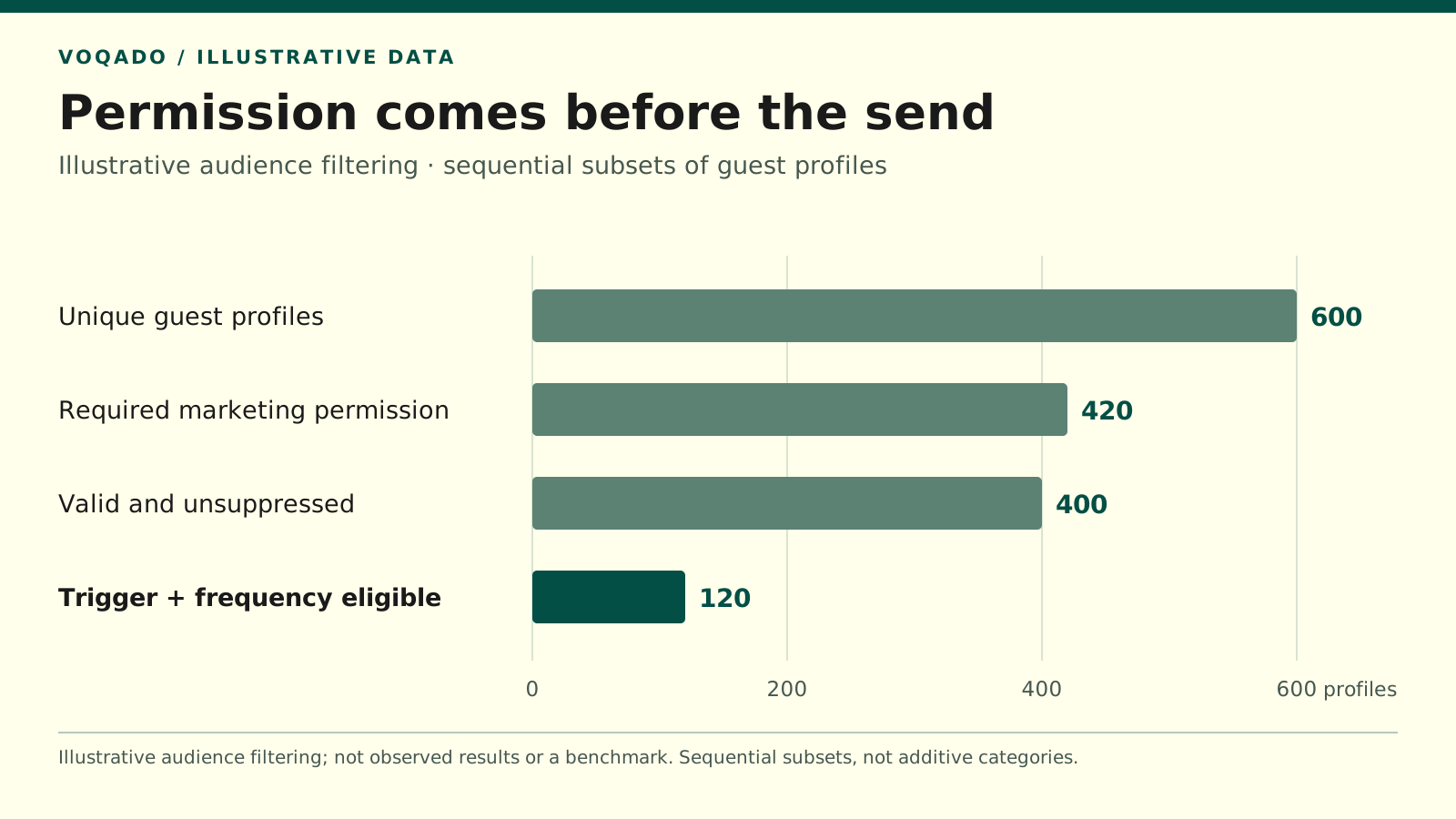
Illustrative audience filtering; not observed results or a benchmark. Counts are guest profiles, not all restaurant guests.
| Stage | Profiles |
|---|---|
| Unique guest profiles | 600 |
| Required marketing permission | 420 |
| Valid and unsuppressed | 400 |
| Trigger + frequency eligible | 120 |
Make the send list smaller and more accurate
Illustrative eligibility check: These sequential subsets are invented planning figures, not VoqadoWiFi results or benchmarks.
| Eligibility stage | Profiles remaining |
|---|---|
| Unique guest profiles | 600 |
| Required marketing permission | 420 |
| Valid and unsuppressed | 400 |
| Trigger and frequency eligible | 120 |
The campaign audience is 120 profiles. The starting database is not the send list.
Put a final eligibility check immediately before sending so new unsubscribes and recent visits can stop queued messages. If several automations become eligible together, choose a priority, such as a current birthday message before a generic win-back.
VoqadoWiFi supports guest WiFi marketing on Omada and UniFi. Before implementing these templates, verify the triggers and suppression controls available in your setup. Test one lifecycle email, record the send conditions and measure observed returns against a randomized holdout before claiming it generated extra visits.
Share this article