

Ubiquiti UniFi gives a venue two very different ways to put something in front of its guest WiFi. The built in hotspot can hand each guest a voucher code. An external portal can ask for an email address instead. Both get people online; they leave you with very different things the next morning.
This guide compares the two for hotels, restaurants, bars, lounges and coworking spaces, and explains why running both on one site needs some planning.
What a UniFi voucher is good at
A voucher is a code the hotspot generates for a guest or a stay. UniFi's own hotspot also offers a simple password, a terms page and payment for access (Ubiquiti, UniFi hotspots and captive portals).
Put this guide to work
Free worksheets, campaign templates and a venue growth calculator. No email gate.
Vouchers are strongest where access is rationed or sold:
- Hotels handing a code over at check in, so access ends when the stay does.
- Coworking spaces selling day passes.
- Events with a known guest list.
The cost is operational. Someone prints the codes, hands them out, and deals with the guest whose code is in a jacket upstairs. And a voucher tells you nothing about who used it: it is access control, not a guest list.
What an email login is good at
An external portal replaces UniFi's login page with one you control. With VoqadoWiFi, you enter the host www.voqadowifi.com in the controller and UniFi adds the fixed path itself, so guests arrive at https://www.voqadowifi.com/guest/s/<site>/. The portal then asks for an email address and a first name and authorizes the device on the controller.
What you get in return:
- A guest list you own, exportable as a CSV at any time.
- Permission on record. The marketing box starts unticked and is stored with its wording, time and source. Accepting the WiFi terms is never treated as marketing consent.
- Regulars skip the form. A recognised device goes straight through within the auto login period, 30 days unless the venue changes it.
- Limits on messages. By default a venue sends at most one message in 7 days and four in 30, never between 21:00 and 09:00 venue time.
What you give up: VoqadoWiFi does not accept voucher codes and does not take payment for access. If you want to charge for WiFi, UniFi's own hotspot is the tool.
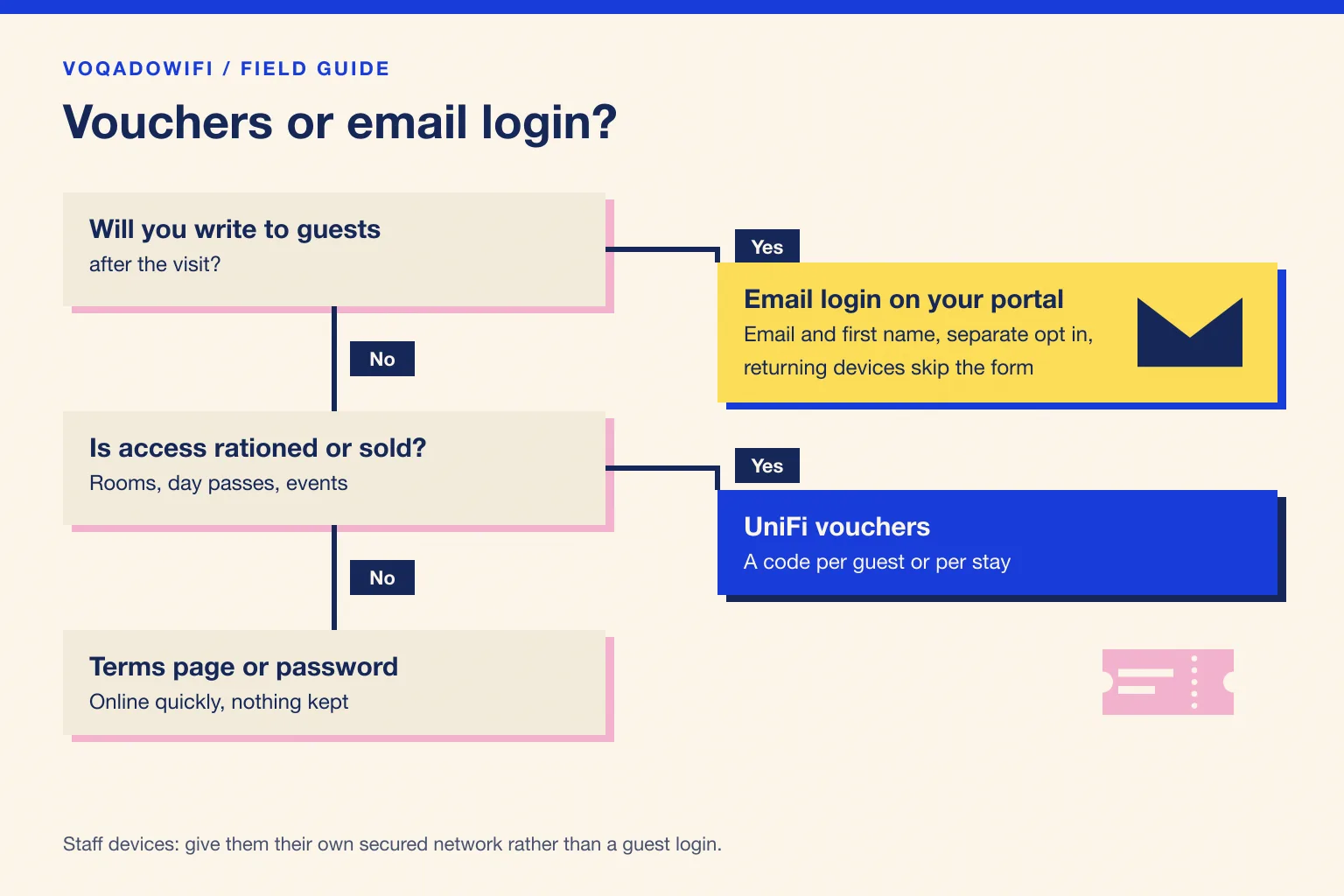
What each looks like to a guest
With a voucher, the guest joins the network, sees UniFi's login page and types the code from a card or receipt. If the code is wrong, expired or already used up, they come back to the desk. On a busy night that queue lands on whoever is nearest the door.
With an email login, the guest joins the network, sees your branded page and types an email address and a first name. They get online whether or not they tick the marketing box. Next time, within the auto login period, the same phone goes straight through with a short welcome back screen instead of the form.
Mistakes that cost venues the most
- Printing one voucher for everyone. A single code on every table is a shared password with extra steps, and it gives you no more than a password would.
- Treating a login as permission to email. Accepting WiFi terms is not marketing consent. Ask separately and keep the record.
- Putting staff tills or tablets behind the guest login. When the session ends, the till drops off the network mid service. Give staff devices their own secured network.
- Never testing on a phone that has joined before. Returning devices behave differently from new ones. Test both before you call the switch done.
Side by side
| Question | Vouchers | Email login on your portal |
|---|---|---|
| Who serves the login page | The UniFi hotspot | Your external portal |
| What the guest does | Types a code you gave them | Types an email and first name |
| Can you contact the guest later | No | Yes, if they agreed |
| Can you charge for access | Yes, with UniFi's hotspot | Not with VoqadoWiFi |
| Work for staff | Printing and handing out codes | None once it is set up |
| Best for | Rooms, day passes, events | Restaurants, bars, lounges, lobbies |
Can you run both on one site?
Plan for the answer being no until you have tested it. Art of WiFi, which builds UniFi portal software, reported in September 2023 that with UniFi controller versions 7.4.x the voucher management function stopped being available when an external portal was active for the site (Art of WiFi, voucher management). We have not confirmed how current versions behave, so check your own controller before promising staff both.
The practical pattern that avoids the question:
- Guests on one guest network with the email login.
- Staff devices and long stay equipment on their own secured network with its own password, not behind any guest login.
- Paid or rationed access handled by a separate UniFi site or by a provider that issues its own codes, if you truly need vouchers alongside a guest list.
Whatever you choose, keep guests isolated from your tills and office devices; our guest WiFi VLAN segmentation guide covers it.
Which one fits your venue
- Restaurants, cafes, bars and lounges: email login. You want regulars back, and nobody wants to hand out codes at a busy bar.
- Hotels: vouchers where WiFi is part of the room and must end with the stay; email login in the lobby, restaurant and bar if you want to hear from non resident guests.
- Coworking spaces: vouchers for day passes; members on their own secured network.
- Event venues: vouchers for ticketed events, email login for public days.
If your venue runs TP-Link Omada instead, the same choice appears as Hotspot vouchers versus External Portal Server; see Omada portal authentication types.
Switching from vouchers to email login
- Build the portal first, with your logo, terms and marketing wording.
- Point a spare guest network at it and test with a phone you control. The UniFi setup hub shows where the external portal setting sits for each console.
- Check that a device really gets online, not just that the page loads. If the page appears but the WiFi never unlocks, start with our guide to a UniFi portal that connects with no internet.
- Choose the session length to fit a visit; our session timeout guide has starting points.
- Retire the old codes and table cards once the real guest network has switched.
The Starter plan is free for one location and 500 guest logins a month, and runs on UniFi hardware you already own; current limits are on the pricing page.
The short version
Vouchers control access. An email login builds a relationship. If you would never write to a guest, vouchers or a terms page are honest choices. If you want regulars back, put an email login on the guest network and keep vouchers for the rooms and passes that genuinely need them.
Get the free Guest WiFi Growth Kit
A diagnostic worksheet, signage copy guests can follow, a campaign brief and a monthly scorecard. Yours to print and share with your team.
Share this article