
A guest WiFi session timeout is the length of time a device stays authorized after your login page before the controller asks it to sign in again. Set it too short and the login page comes back halfway through dinner. Set it too long and access keeps working after the guest has gone home, and your visit counts stop meaning much.
There is no single right number. The right session length is the one that fits how long a visit lasts at your venue, and that is different for a coffee bar, a restaurant, a lounge and a hotel. This guide gives you starting points for each, explains the settings on TP-Link Omada and Ubiquiti UniFi, and shows how to check your choice against what actually happens.
Two clocks decide what a guest sees
Most confusion about "the WiFi keeps asking me to log in" comes from treating two separate settings as one.
Put this guide to work
Free worksheets, campaign templates and a venue growth calculator. No email gate.
- Session length decides when the controller asks the device to sign in again. VoqadoWiFi sends it with every guest authorization, and it is 480 minutes (8 hours) unless the location is set otherwise.
- Auto login period decides whether VoqadoWiFi recognises a returning device and lets it straight through instead of showing the form. It is set in the portal builder, with presets of 0, 1, 7, 30 and 90 days, and the default is 30 days.
So a session that ends is not the same as a guest retyping their email. When a recognised device comes back after the session ends, the guest sees a brief welcome back screen and is reconnected. If regulars are filling in the form every visit, that is an auto login or private address problem, and our troubleshooting page on guests who have to log in every day walks through the fix. This article is about choosing the session length itself.
Where the timeout lives on Omada and UniFi
On TP-Link Omada, portals built into the controller have an Authentication Timeout: when the set time is reached, clients need to sign in again. TP-Link lists that setting for the No Authentication, Simple Password, RADIUS Server and External LDAP Server types (TP-Link Omada, portal authentication). When the portal is an External Portal Server, as it is with VoqadoWiFi, the portal tells the controller how long to authorize the guest each time it lets someone online.
On Ubiquiti UniFi the same idea applies. With an external portal, VoqadoWiFi passes a duration in minutes with each guest authorization. The UniFi hotspot also has its own expiry setting (Ubiquiti, UniFi hotspots and captive portals).
If the controller has its own expiry configured as well, the shorter of the two wins. Before you change anything in your portal, open the controller and check that nothing there quietly cuts sessions short.
What goes wrong when it is too short
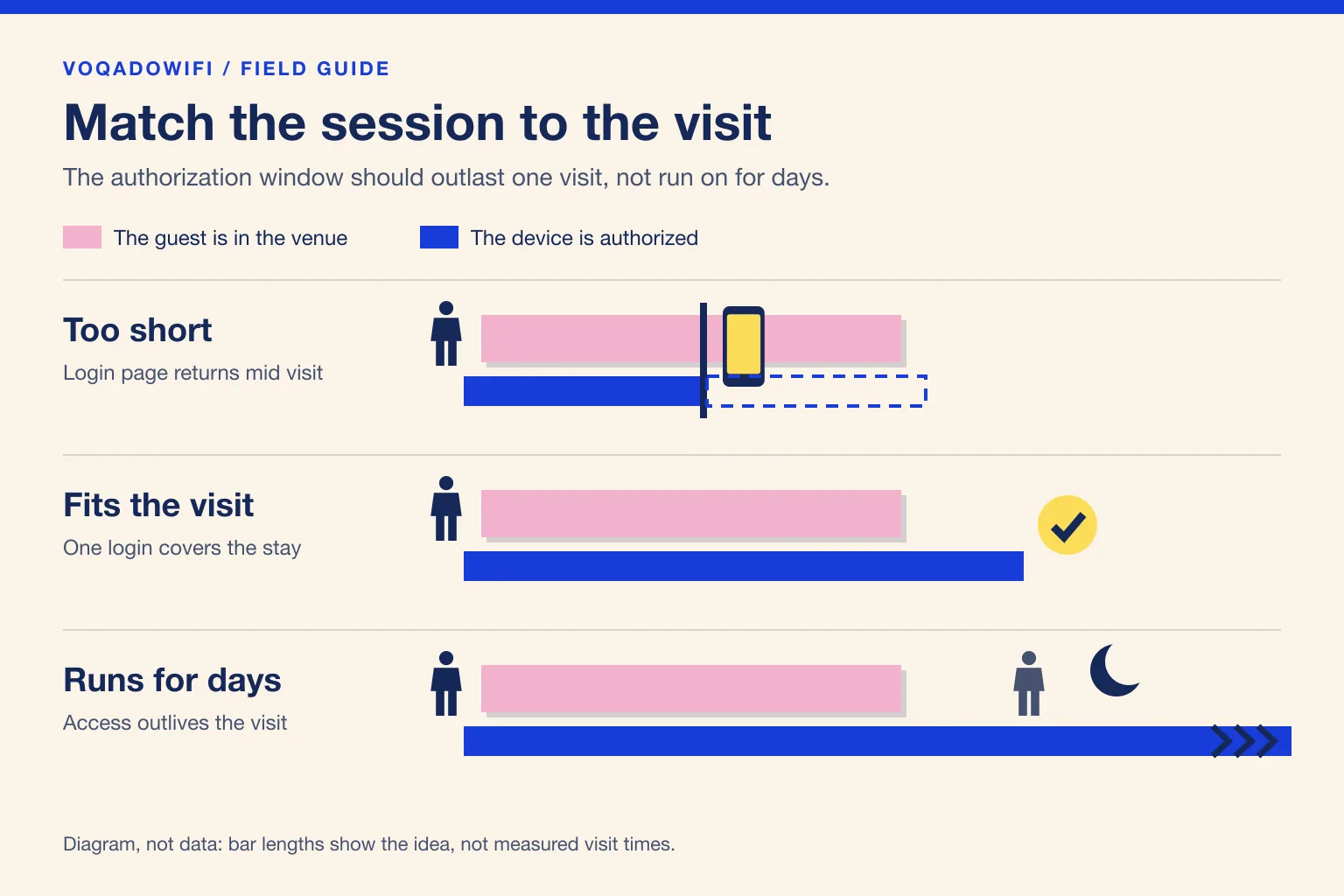
A short session is the setting guests notice. The login sheet pops up again mid meal, often while someone is halfway through paying a bill from a QR code or showing a friend a photo. On an iPhone it appears as the captive network sheet, which can feel like a security warning to a guest who has never seen it twice in one evening; our explainer on the iOS captive network assistant shows what they see.
Short sessions also produce misleading data. Each time the portal comes back, a recognised device creates another login, so one long dinner can look like two visits. And because a captive portal authorizes a guest for a set time, no WiFi session in your reports can look longer than that time, however long the guest stayed. That is one of the reasons we treat WiFi dwell time as a rough signal and not a measurement.
What goes wrong when it is too long
A long session is the setting guests do not notice, which is exactly the problem.
- Access outlives the visit. A phone authorized for days can keep using your network from the pavement, the flat above the bar or the car park after closing.
- Visits stop being counted. Each return to the login page is also how a new visit gets recorded. If a regular's session from Monday is still valid on Wednesday, Wednesday may never show up.
- Your terms are seen less often. A guest accepts your WiFi terms at login. With a session measured in weeks, the next person to pick up a shared tablet or a lost phone inherits that acceptance.
There is also a ceiling you cannot move. Apple says iPhones using a Rotating private address change it every two weeks, and on networks with weak or no security that is the default (Apple, private WiFi addresses, checked October 2026). Most guest networks are open, so a session longer than two weeks often outlasts the address it was granted to. Our guide to private WiFi addresses and guest analytics covers what that does to your numbers.
Starting points by venue type
These are our planning starting points, not measured averages. Use them to pick a first value, then adjust with what you see at your own venue.
| Venue | Plan around | Starting session length |
|---|---|---|
| Cafe or coffee bar | A drink, sometimes a long laptop stay | 3 hours |
| Restaurant with table service | One meal, including a slow dinner | 3 to 4 hours |
| Bar or nightlife venue | An evening, ending at closing | 6 hours |
| Hookah or cigar lounge | A long evening session | 8 hours |
| Coworking space or hotel lobby | A working day | 10 hours |
| Hotel guest network | One night, with returns handled by auto login | 24 hours |
Three rules sit behind the table.
- Cover the longest normal visit, plus a margin. A session that ends five minutes before the bill arrives is the worst outcome.
- End before you reopen. A bar session that runs into the next afternoon merges two days into one visit.
- Let auto login carry the relationship. Recognition of regulars belongs to the auto login period, not to a session that never ends. Thirty days fits most venues; a hotel with long stays or a lounge with weekly regulars may want longer.
Our lounge setup notes make the same point for long evening venues: pick a session length close to a typical visit, and a generous auto login period so regulars are waved through.
Check your choice against what actually happens
Once a value is set, give it two or three weeks and look for these signs.
- Complaints from long stays. If the people mentioning the login page are the laptop guests, the late diners or the lounge regulars, the session is ending inside their visit.
- Two visits from one guest on the same evening. If your guest list shows the same person logging in twice a few hours apart, the session probably ended mid visit.
- Return visits that never appear. If you know a regular came in and the dashboard shows nothing for that day, check whether an older session was still valid.
- Use beyond opening hours. If your controller shows authorized guest clients long after closing, the session is longer than any real visit.
Treat a single odd case as noise. Change the value when the same pattern repeats over several days.
Keep the guest network separate either way
No session length makes up for a guest network that can reach your tills, cameras or office computers. Whatever value you choose, keep guests on their own network segment with client isolation, as described in our guest WiFi VLAN segmentation guide. A long session on a properly isolated network is an inconvenience. A long session on a flat network is a risk.
How to change it on VoqadoWiFi
- Session length is set per location. Today it is changed by our team rather than from a dashboard switch, so send us the value you want for each venue.
- Auto login period is in the portal builder, in the auto login setting.
- Controller expiry lives in your controller. On Omada, check the portal's authentication timeout; on UniFi, check the hotspot expiration. Our Omada setup hub and UniFi setup hub show where each sits.
After any change, test it the slow way: connect a phone you control, note the time, and confirm the login page returns when you expect it to and not before. That one test catches the case where a controller setting overrides the value you asked for.
The short version
Set the session to cover your longest normal visit with a margin, end it before you reopen, and let a generous auto login period handle regulars. Most venues end up between 3 and 8 hours; hotels are the exception at around a day. Then let two weeks of your own data tell you whether to move it.
Get the free Guest WiFi Growth Kit
A diagnostic worksheet, signage copy guests can follow, a campaign brief and a monthly scorecard. Yours to print and share with your team.
Share this article