
Before you import a guest email list into a new WiFi provider, make sure the file preserves who can receive marketing, who must not, and how you know the difference. A successful contact import can still be a failed migration if it silently turns an old unsubscribe into an active subscriber.
This checklist focuses on the data handover: consent evidence, suppression records, CSV mapping, conflicting duplicates and final checks. For the wider network cutover, use our provider-switching guide. Changing the portal address and deciding which contacts may receive email are separate jobs.
This is operational guidance, not legal advice. Privacy and electronic-marketing requirements vary by jurisdiction, and your provider’s contract can affect export and deletion procedures.
Put this guide to work
Free worksheets, campaign templates and a venue growth calculator. No email gate.
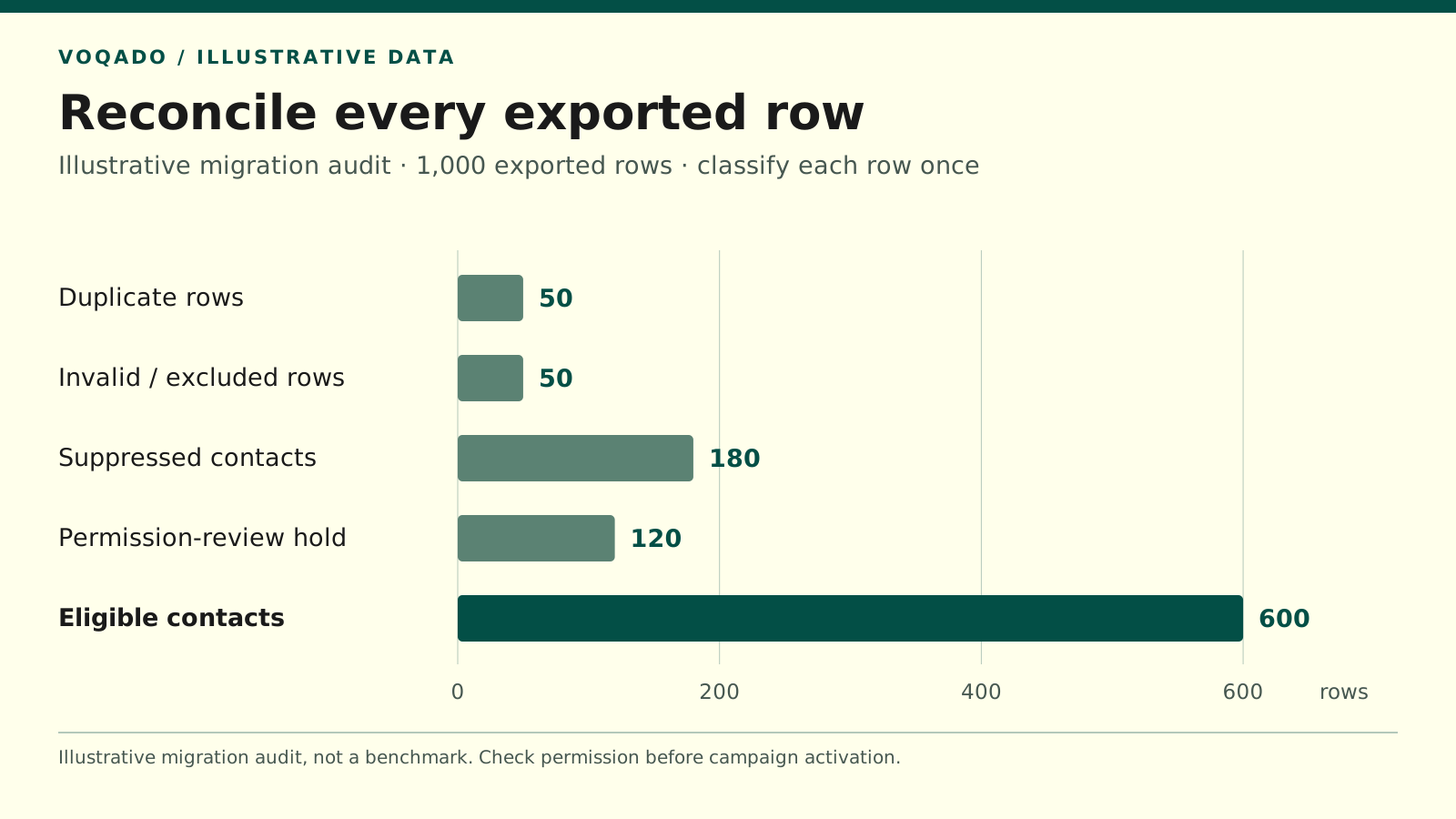
Illustrative migration audit, not a benchmark. Classify each exported row once; permission is checked before campaign activation.
| Category | Rows |
|---|---|
| Duplicate rows | 50 |
| Invalid / excluded rows | 50 |
| Suppressed contacts | 180 |
| Permission-review hold | 120 |
| Eligible contacts | 600 |
1. Decide which systems are actually changing
Write down the current and future systems for:
- WiFi session and connection records
- Guest contact profiles
- Consent evidence and privacy-notice versions
- Campaign delivery and unsubscribe processing
- Bounce, complaint and suppression records
If the email service stays the same, you may not need to migrate the marketing audience at all. You may only need to connect the new portal to the existing, permission-aware audience. Confirm how existing contacts are updated before activating that connection.
Name one migration owner and one reviewer. Record the export cutoff, the destination account and the point at which automated messages may resume. Keep welcome emails and import-triggered automations paused until the checks below pass.
2. Export evidence and exclusions with the contacts
A file containing only names and email addresses is incomplete for a permission-based marketing program. Request the available consent history, unsubscribes, complaints, hard-bounce exclusions and relevant statement versions while you still have access to the old system.
For consent-based processing, the UK ICO describes keeping evidence of who agreed, when, how, what they were told and whether they withdrew. Preserve the historical wording or a reliable archived version, rather than linking every old record to today’s form. ICO guidance on recording consent
Ask the old provider explicitly:
Please provide the contact export, available permission and withdrawal records, suppression and delivery exclusions, and the consent wording or version references associated with those records. Please also identify any fields or history that the export does not include.
Keep raw exports read-only in an access-controlled location. Make a separate working copy for cleaning. Do not email the full guest list around the business or upload it to an unfamiliar conversion tool.
3. Build a field map before importing
The following is a working schema, not a claim that every WiFi platform supports these field names. Map it to the destination’s documented import format. Where evidence cannot be imported, retain it in an approved evidence store and keep a stable reference from the destination contact.
| Working field | Preserve or decide |
|---|---|
| contact_id, email | Original identifier and address; retain original values |
| location_id, source | Where and how the record was collected |
| marketing_status | Subscribed, unsubscribed, never subscribed or unresolved |
| permission_basis | Recorded basis for this marketing use; do not guess |
| controller_or_sender | Business covered by the permission |
| channel, purpose | Email and the described marketing purpose |
| consent_at, consent_timezone | Original event time with timezone or explicit uncertainty |
| statement_version, evidence_ref | Wording shown and where supporting evidence is held |
| withdrawn_at, suppression_scope | Withdrawal time and applicable sender/channel scope |
| delivery_status, exclusion_reason | Hard bounce, complaint or another sending restriction |
| imported_at, import_batch | Migration audit information, separate from consent time |
A minimal draft CSV header for a mapping exercise is:
contact_id,email,location_id,marketing_status,permission_basis,controller_or_sender,channel,purpose,consent_at,consent_timezone,statement_version,evidence_ref,withdrawn_at,suppression_scope,delivery_status,import_batchUse a proper CSV export with quoted fields where needed. Check non-English names, commas, date formats and empty values. Preserve missing information as missing; the import date is not the consent date, and a blank marketing field is not “yes.”
An address supplied for network access is also not automatically a subscriber. Email platforms distinguish these states; Mailchimp, for example, defines non-subscribed contacts as people who supplied contact details without opting into marketing. Mailchimp contact-status explanation
4. Resolve duplicates without losing a withdrawal
Group potential duplicate email records and compare their histories before deciding the current state. Trim accidental surrounding whitespace, but do not automatically delete plus-tags, rewrite unfamiliar domains or merge addresses because the names look similar. Those changes can join different people’s records or send to a guessed address.
Use these conservative rules:
- An applicable withdrawal or complaint blocks a send unless a later, valid and sufficiently evidenced change permits it.
- A later visit or WiFi login is not evidence of renewed marketing permission.
- Two conflicting records with unclear times or scopes go into review, not the active audience.
- An import’s update setting must not overwrite a destination unsubscribe with an older subscribed flag.
“Newest row wins” is too crude. The newest row could be a network session update that says nothing about permission.
5. Establish suppression before activation
Check the destination’s documented workflow for preserving unsubscribes and exclusions. Where it supports importing suppression records first, do that before loading eligible subscribers. Otherwise, use its supported protected import process and keep all campaigns disabled until exclusions are verified.
Mailchimp’s account-combination guidance specifically warns that subscribed, unsubscribed and cleaned files need the correct contact status on import. Its checks do not remove your responsibility to verify the result. Mailchimp account-migration guidance
Suppression data has a restricted purpose: preventing unwanted contact. The ICO recommends retaining only what is needed to honor the person’s preference. In the United States, the FTC says addresses belonging to people who opted out cannot be sold or transferred, with an exception for a company hired to help comply with CAN-SPAM. Confirm that your transfer and contract fit the applicable rules. ICO suppression guidance, FTC CAN-SPAM guidance
6. Reconcile every exported row
Use explicit, non-overlapping outcomes rather than comparing two headline list totals.
| Illustrative outcome | Exported rows |
|---|---|
| Duplicate rows consolidated | 50 |
| Invalid or excluded rows | 50 |
| Contacts kept suppressed | 180 |
| Contacts held for permission review | 120 |
| Contacts eligible for the intended marketing | 600 |
| Total exported rows | 1,000 |
Illustrative example only, not VoqadoWiFi customer data or a benchmark. Each row is classified once. After consolidating duplicates and excluding invalid rows, 900 contact records remain: 180 suppressed, 120 held and 600 eligible. “Eligible” here assumes the intended sender, channel and purpose have been checked; import success alone does not establish it.
Review your destination’s report for added, updated, skipped and rejected records. Mailchimp documents those distinctions in its import-results report. Save the report promptly alongside your reconciliation. Mailchimp import-result documentation
7. Close the gap between export and cutover
A guest can unsubscribe after Monday’s export and before Wednesday’s activation. A clean original file does not protect you from that gap.
Take a final delta export of new contacts, permission changes and exclusions at the agreed cutover. Apply withdrawals and other restrictions before enabling sends. If the systems remain active together, define how changes move between them and who checks that synchronization.
Do not restore an old snapshot during rollback without applying the newer suppressions. A technical rollback must not undo a guest’s choice.
8. Test the important failure cases
Use test addresses you control and destination preview tools before any real campaign. Verify that:
- A properly evidenced subscriber is eligible for the correct sender and purpose.
- A historical unsubscribe remains blocked after import and a subsequent WiFi login.
- An unknown-permission contact remains held rather than being defaulted to subscribed.
- A new unsubscribe reaches every system that can send the relevant marketing.
- A duplicate contact cannot receive the same campaign twice through separate imports.
- Importing a contact does not unexpectedly trigger welcome or re-engagement messages.
Do not send a blanket “please re-consent” email to fix uncertain records. Whether you may send that request needs its own assessment. Canada’s CRTC, for example, notes that an electronic request for express consent is itself a commercial electronic message under CASL. CRTC guidance on consent
Sign off the handover
Keep a short acceptance record: files received, exclusions preserved, unresolved records held, test results, final delta applied and person approving activation. Confirm the old provider’s contractual return/deletion process and the retention plan for working files; do not erase needed evidence simply because the new system is live.
For a VoqadoWiFi move, confirm the current import fields and suppression behavior before transferring the full list. A small, verified test batch is more useful than assuming every provider represents consent in the same way. The migration is ready when the new workflow honors the same permissions and restrictions the guest had before the switch.
Share this article